
VERSION 1.45 · 车辆成本管理VERSION 1.45 · VEHICLE COST MANAGEMENT
每次加油,每次保养。
这辆车花了多少,
都算得明白。每次加油,
每次保养。
都算得明白。Every fill-up.
Every service.
Every cost, made clear.Every fill-up.
Every service.
Every cost, clear.
记录油耗、保养和车辆支出,让每一次骑行都有数据依据。
Track fuel, maintenance, and ownership costs—so every ride is backed by real data.
iPhone iPad Mac · 14 天完整试用· 14-day full trial

4.56L/100km
¥0.45每公里per km
核心功能Core features
油耗、保养、成本,
全部说清楚。Fuel, service, and cost.
All made clear.
从建立车辆档案开始,把每次加油、每项保养和每一笔费用变成清晰、可追溯的数据。
Start with a vehicle profile, then turn every fill-up, service, and expense into clear, traceable data.
01 · 车库01 · GARAGE
车辆、主题和规则,都在这里Vehicles, scenes, and rules in one place
- 摩托车与汽车分别记录
- 虚拟车库与应用主题
- 保养规则和首页排序
- Separate motorcycle and car records
- Virtual Garage scenes and appearance
- Maintenance rules and Home layout
真实油耗,不靠猜Real fuel economy, not guesswork
- 满箱法计算真实油耗
- 单次、区间与长期趋势
- 油费支出和每公里成本
- Full-tank fuel economy calculation
- Trip, interval, and long-term trends
- Fuel spend and cost per kilometer
该保养时,提前提醒Service reminders before they are due
- 按里程或时间设置周期
- 记录保养项目与实际费用
- 完整维护历史随时可查
- Mileage- or time-based schedules
- Service items and actual spending
- A complete, searchable history

iCloud Sync · 跨设备同步Cross-device sync
一个数据库,
三端同步。One database.
Three devices.
不是三套各自独立的数据。iPhone、iPad 和 Mac 连接同一个私人 iCloud 数据库:车辆档案、加油记录、油耗区间、保养状态和费用历史,在三个设备之间保持一致。Not three separate copies. iPhone, iPad, and Mac connect to one private iCloud database, keeping vehicle profiles, fill-ups, fuel intervals, maintenance status, and cost history consistent everywhere.
完整功能介绍Full feature walkthrough
从一箱油,
看懂一辆车。Know your vehicle,
one fill-up at a time.
这不是界面截图的拼接,而是一段带中文旁白的真实 iPhone 产品体验。完整了解油耗、费用、保养提醒与多车档案如何一起工作。
A narrated, real iPhone product experience—not a slideshow. See fuel economy, costs, service reminders, and your whole garage working together.
- 01油耗与用车成本Fuel economy & running cost
- 02保养记录与到期提醒Service history & reminders
- 03摩托车与汽车独立档案Profiles for motorcycles & cars
摩托油耗 1.45 · iPhone · 中文功能介绍
Moto Fuel Tracker 1.45 · iPhone · English feature walkthrough
Privacy · 隐私是默认设置Privacy · Private by design
你的车辆数据,
只属于你。Your vehicle data
belongs to you.
本地优先保存,通过你的私人 iCloud 数据库同步。无广告、无第三方分析、无跨 App 追踪。
Local-first storage with sync through your private iCloud database. No ads, third-party analytics, or cross-app tracking.
阅读隐私政策Read our privacy policy →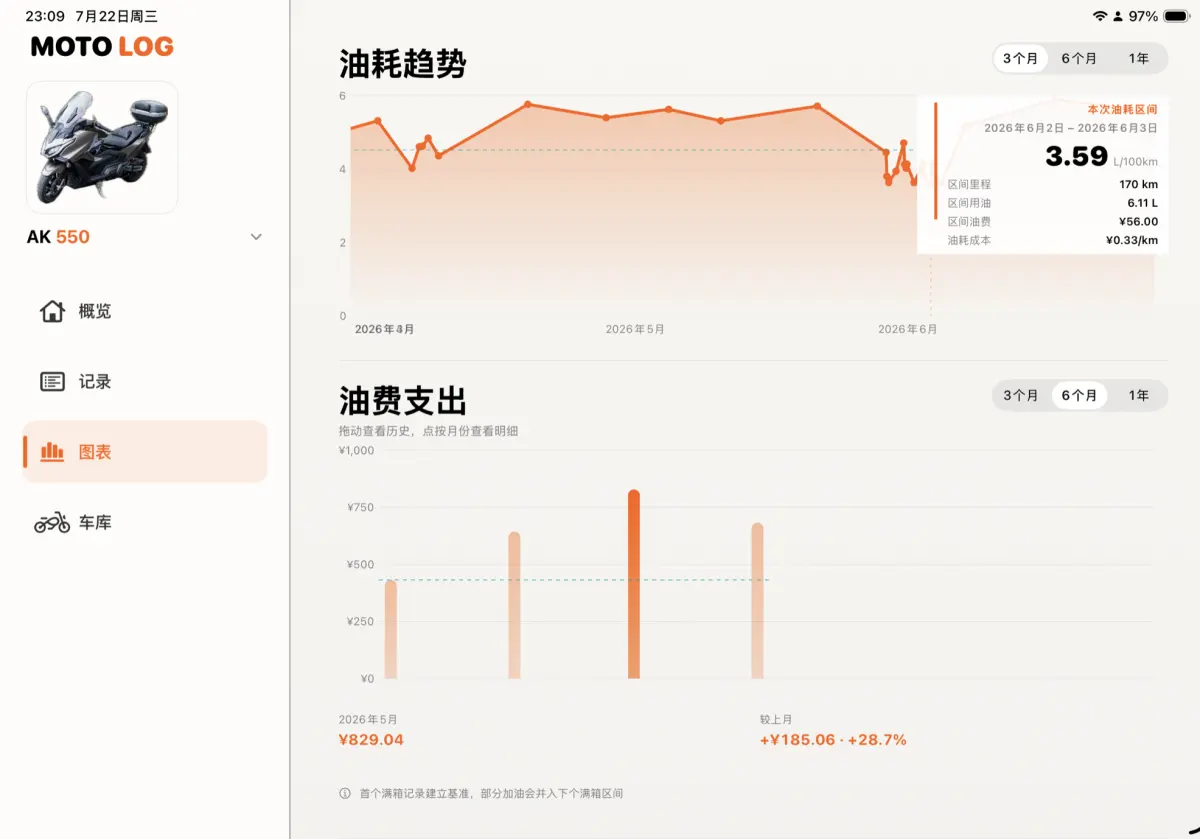
先完整体验,再决定Try everything before deciding
14 天完整试用。
没有自动续费。14 days, fully unlocked.
No auto-renewal.
试用期间可使用所有功能。结束后不会自动扣款;如决定继续,可在 App 内一次性永久解锁。Use every feature during the trial. You will not be charged automatically; continue with a one-time lifetime unlock if the app is right for you.
- ✓一次性永久解锁,不是订阅One-time lifetime unlock, not a subscription
- ✓Excel 导入、导出与本机恢复备份Excel import, export, and local restore
- ✓中文、英文与深浅外观Chinese, English, Light and Dark appearances